Tokyo Westerns CTF 2017 / Published
rev_rev_rev
Reversing a 32-bit ELF that reverses its input, transforms it with bitwise operations, and NOTs it, then brute-forcing the flag one character at a time.
Inspecting the ELF binary
In this challenge, we are given a file rev_rev_rev-a0b0d214b4.... Let’s start of by running the file command to identify what kind of file this is.
ubuntu@ubuntu-xenial:~/reverevrev$ file rev_rev_rev-a0b0d214b4aeb9b5dd24ffc971bd391494b9f82e2e60b4afc20e9465f336089f
rev_rev_rev-a0b0d214b4aeb9b5dd24ffc971bd391494b9f82e2e60b4afc20e9465f336089f: ELF 32-bit LSB executable, Intel 80386, version 1 (SYSV), dynamically linked, interpreter /lib/ld-linux.so.2, for GNU/Linux 2.6.32, BuildID[sha1]=e33eb178391bae637823f4645d63d63eac3a8d07, stripped
Looks like it’s a 32 bit ELF binary, so let’s try running it.
ubuntu@ubuntu-xenial:~/reverevrev$ chmod +x rev_rev_rev-a0b0d214b4aeb9b5dd24ffc971bd391494b9f82e2e60b4afc20e9465f336089f
ubuntu@ubuntu-xenial:~/reverevrev$ ./rev_rev_rev-a0b0d214b4aeb9b5dd24ffc971bd391494b9f82e2e60b4afc20e9465f336089f
Rev! Rev! Rev!
Your input: 123
Invalid!
Tracing the input transformations
Seems like it’s looking for some sort of key, so we’ll try to get a better understanding of what is going on by looking at the binary in IDA.
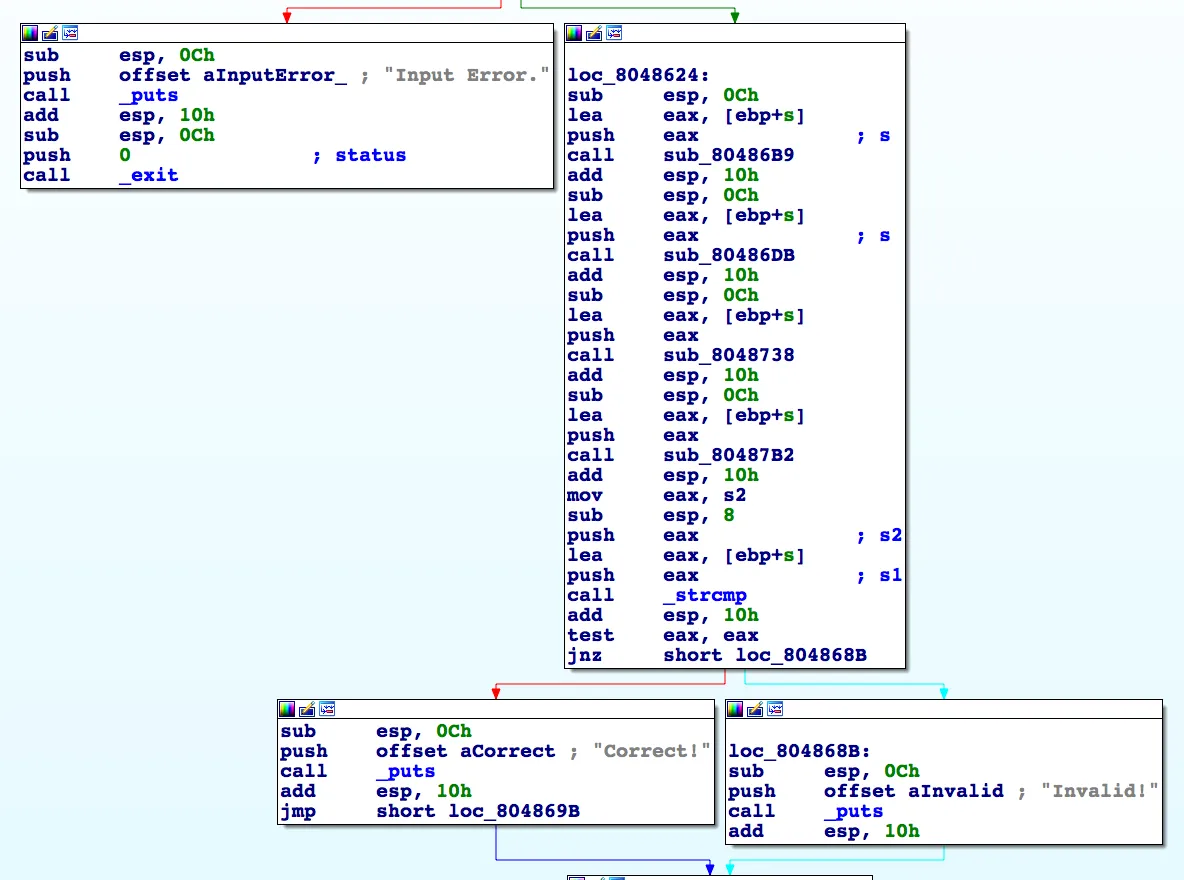
By looking at main() we observe that the user input is passed to sub_80486B9, followed by sub_80486DB, then sub_8048738, and finally sub_80487B2. The output of that is then compared with s2. Let’s examine the aforementioned functions.
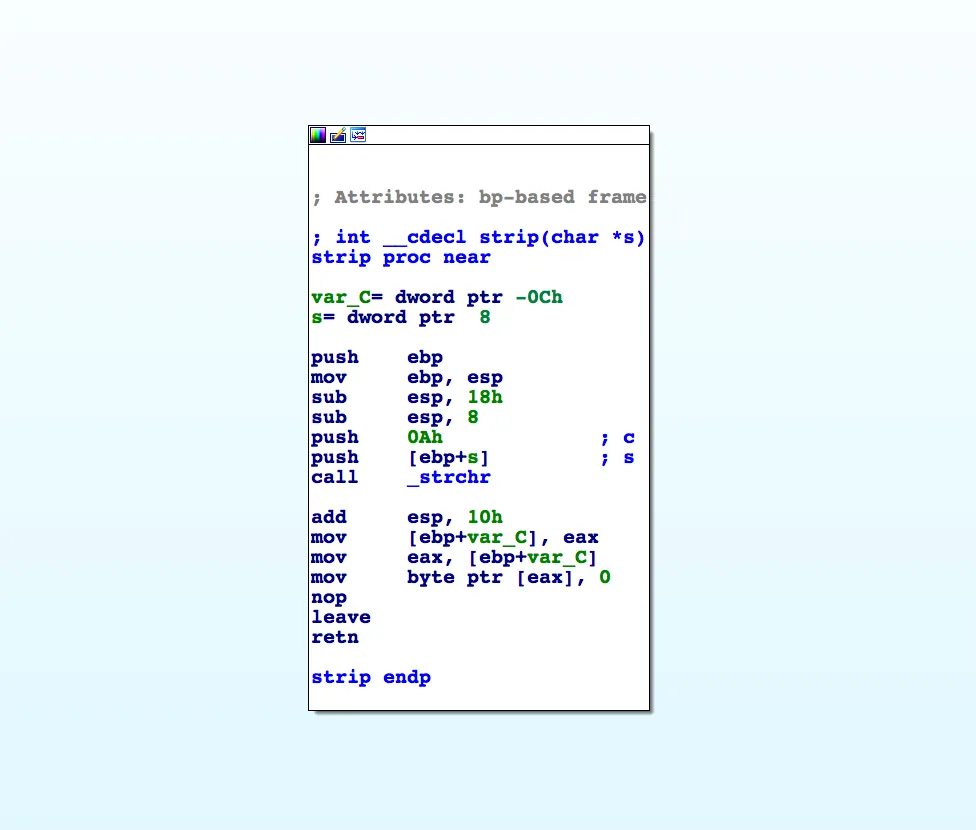
In sub_80486B9, strchr() is called with our input and 0x0A, which is a newline ascii character. A 0x00 (null) character is then placed at the address returned by strchr(). Based on this, we can infer that sub_80486B9 is simply a newline stripping function, since it’s just replacing the newline character with a null byte.
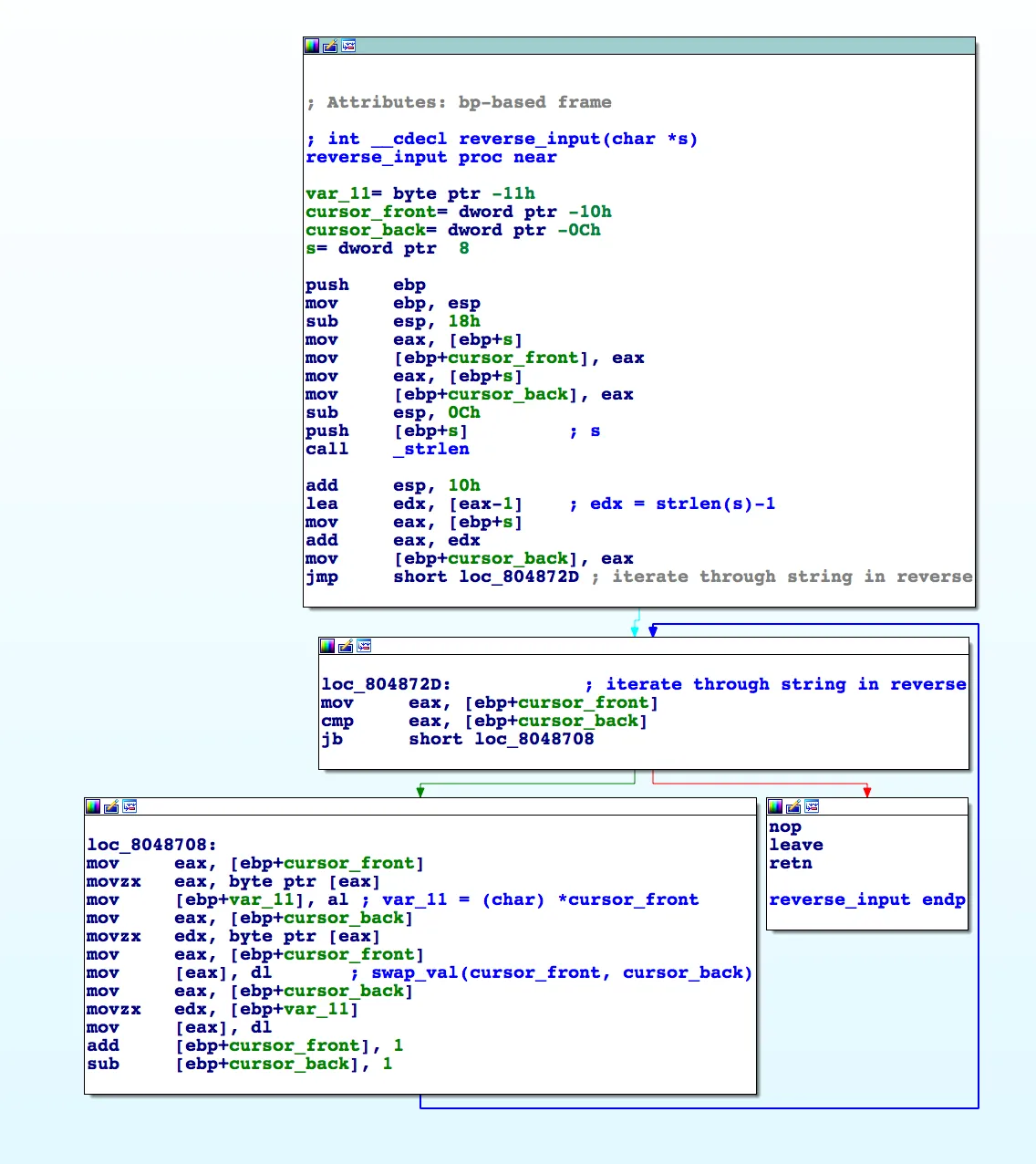
sub_80486DB is simply reversing our input. It first gets a pointer to the end of our input using input + (strlen(input)-1) and also maintains a pointer to the front of our input. In the loop, it simply swaps the content of the front and back pointers until the middle of our string, effectively reversing it.
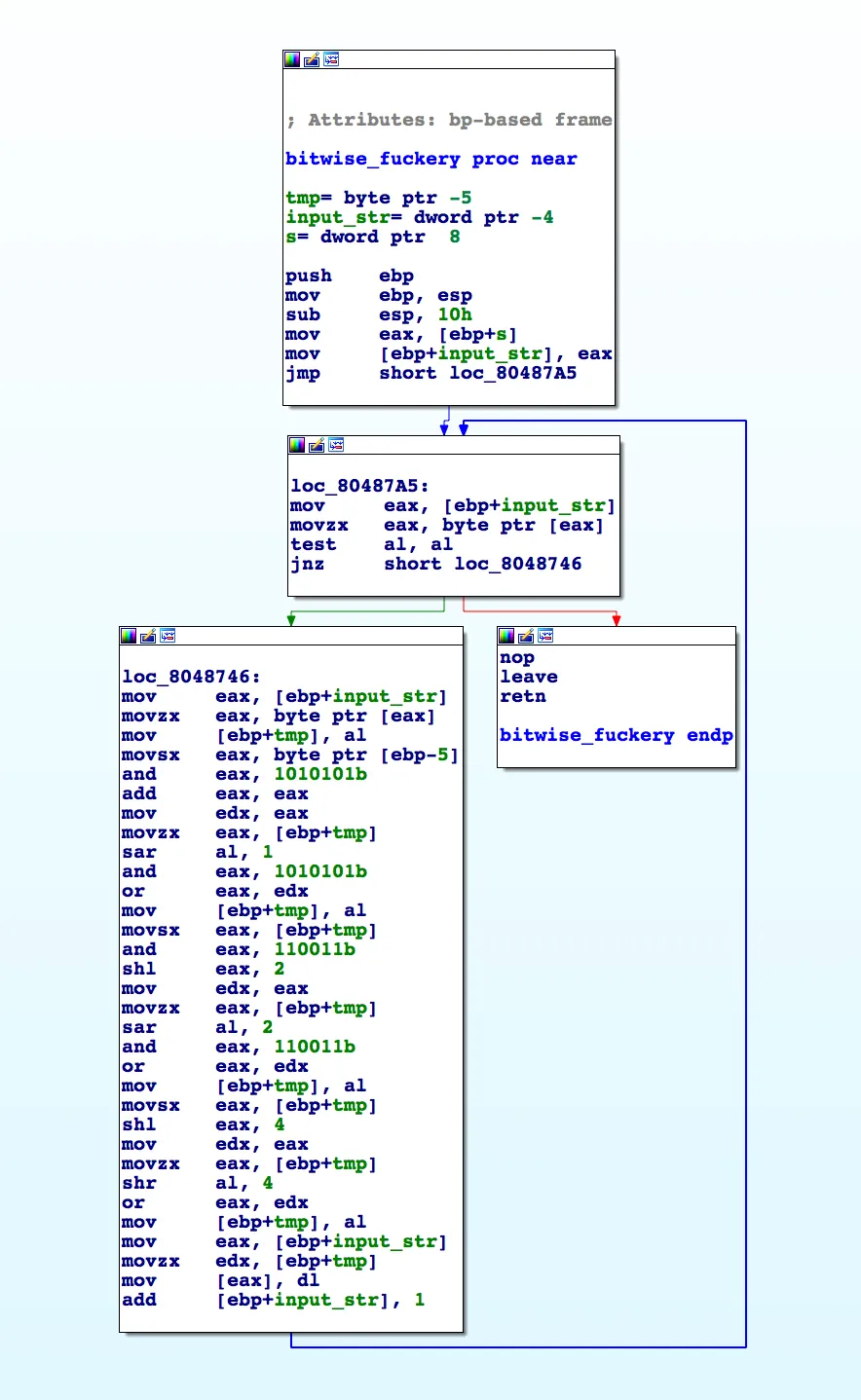
sub_8048738 iterates through each character in our string and performs a number of bitwise operations to transform it.
output = ''

for j in input_string:
	j = ((j & 0b1010101) << 1) | ((j >> 1) & 0b1010101)
	j = ((j & 0b110011) << 2) | ((j >> 2) & 0b110011)
	j = (j << 4) | (j >> 4)

	output += chr(j & 0xff) # bitmask to ensure j in 0x00-0xff range
The code above implements the aforementioned bitwise operations. Taken together, the three lines swap adjacent bits, then adjacent pairs, then the two nibbles, which reverses the order of the bits in each byte.
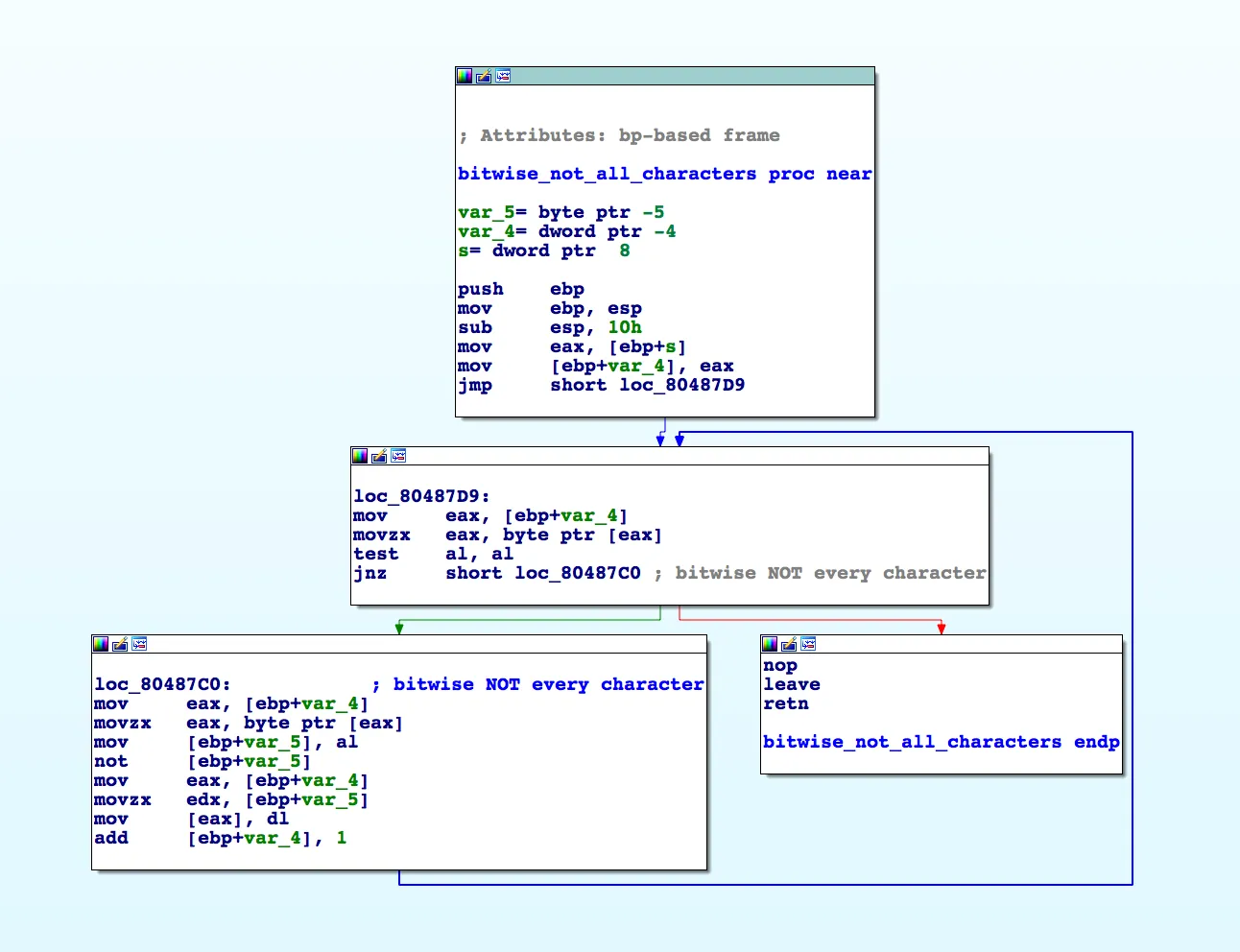
sub_80487B2 just performs a bitwise NOT on each character in our input.
Recovering the flag one character at a time
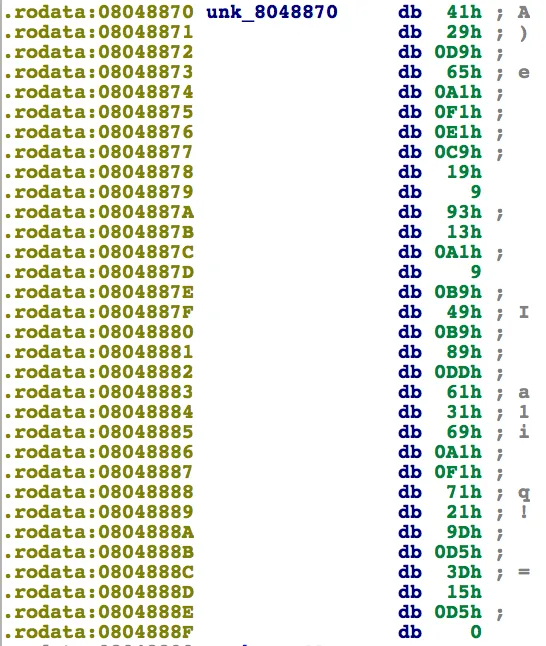
After running through all 4 subroutines, the output is then compared to the string above.
#! /usr/bin/python


def bit_not(n, numbits=8):
    return (1 << numbits) - 1 - n

encrypted = '\x41\x29\xd9\x65\xa1\xf1\xe1\xc9\x19\x09\x93\x13\xa1\x09\xb9\x49\xb9\x89\xdd\x61\x31\x69\xa1\xf1\x71\x21\x9d\xd5\x3d\x15\xd5'
encrypted = ''.join([chr(bit_not(ord(i))) for i in encrypted][::-1])

flag = ''

for i in encrypted:
        print 'Bruteforcing flag...'
        for j in range(0xff+1):
                t = j
                j = ((j & 0b1010101) << 1) | ((j >> 1) & 0b1010101)
                j = ((j & 0b110011) << 2) | ((j >> 2) & 0b110011)
                j = (j << 4) | (j >> 4)

                if chr(j & 0xff) == i:
                        flag += (chr(t))
                        break

        print 'flag: {}'.format(flag)
Using the script above, we are above to bruteforce each character of the flag as seen below.
ubuntu@ubuntu-xenial:~/test/reverevrev$ python solve.py
Bruteforcing flag...
flag: T
Bruteforcing flag...
flag: TW
Bruteforcing flag...
flag: TWC
Bruteforcing flag...
flag: TWCT
Bruteforcing flag...
flag: TWCTF
Bruteforcing flag...
flag: TWCTF{
Bruteforcing flag...
flag: TWCTF{q
Bruteforcing flag...
flag: TWCTF{qp
Bruteforcing flag...
flag: TWCTF{qpz
Bruteforcing flag...
flag: TWCTF{qpzi
Bruteforcing flag...
flag: TWCTF{qpzis
Bruteforcing flag...
flag: TWCTF{qpzisy
Bruteforcing flag...
flag: TWCTF{qpzisyD
Bruteforcing flag...
flag: TWCTF{qpzisyDn
Bruteforcing flag...
flag: TWCTF{qpzisyDnb
Bruteforcing flag...
flag: TWCTF{qpzisyDnbm
Bruteforcing flag...
flag: TWCTF{qpzisyDnbmb
Bruteforcing flag...
flag: TWCTF{qpzisyDnbmbo
Bruteforcing flag...
flag: TWCTF{qpzisyDnbmboz
Bruteforcing flag...
flag: TWCTF{qpzisyDnbmboz7
Bruteforcing flag...
flag: TWCTF{qpzisyDnbmboz76
Bruteforcing flag...
flag: TWCTF{qpzisyDnbmboz76o
Bruteforcing flag...
flag: TWCTF{qpzisyDnbmboz76og
Bruteforcing flag...
flag: TWCTF{qpzisyDnbmboz76ogl
Bruteforcing flag...
flag: TWCTF{qpzisyDnbmboz76oglx
Bruteforcing flag...
flag: TWCTF{qpzisyDnbmboz76oglxp
Bruteforcing flag...
flag: TWCTF{qpzisyDnbmboz76oglxpz
Bruteforcing flag...
flag: TWCTF{qpzisyDnbmboz76oglxpzY
Bruteforcing flag...
flag: TWCTF{qpzisyDnbmboz76oglxpzYd
Bruteforcing flag...
flag: TWCTF{qpzisyDnbmboz76oglxpzYdk
Bruteforcing flag...
flag: TWCTF{qpzisyDnbmboz76oglxpzYdk}
flag: TWCTF{qpzisyDnbmboz76oglxpzYdk}